
Currently, there are only two kinds of phones. Smartphones and dumb phones. I don’t think that these terms are descriptive enough. Take, for example, the iPhone versus the $14.99 flip phone you can get at Walmart. Obviously, the iPhone is a smartphone and the flip phone is a dumb phone. Now take a phone in the middle of the pack maybe one with a slide-out keyboard but no internet. Where does it fit? Does it qualify as a smart phone? Or is it a kinda-dumb smartphone? Well, my opinion is that that is a dumb phone. Where, then, does the little flip phone come in? Does it get put into the dumb phone category with the phone with the slide-out keyboard? No way! It is a much dumber phone. But that still doesn’t answer the question. Where does it get placed on the ladder of phone categories? Let me propose a new rung on the ladder. A very low rung… Introducing… The idiot phone. Yes, the idiot phone. With this new phone categorization, the problem of how to categorize a flip phone is solved.
One of the most annoying things about the RPi for most of us is that it was built by Brits. Here are a few of the ramifications of this fact:
- By default, the trash can is called the rubbish bin. I don’t know about you, but I don’t normally throw things into the “rubbish bin”, I throw them into the “trash can”
- I don’t want to use British servers with British language repos when I use
sudo apt-get updateetc.
How do we make the RPi recognize that we aren’t Brits? Well, we need to change the locale to en_US. Here’s how to do that:
Editorial: iOS 7 shows how Apple is leading mobile computing
When they stop complaining, it will be a sign Apple isn’t innovating.
- Appleinsider Editorial
This is one of the best pro-Apple, anti-Everything else posts I have seen. It’s probably very biased and I cannot comment on the historical accuracy of all of the claims made in the article, however I will say that it is a good read. (It’s a long article so it’s a good lunch break read, not a coffee break read.)
This post is for people who have a Raspberry Pi (RPi for short) and want to control their RPi remotely, from a Windows computer on the network.
DISCLAIMER: I AM NOT RESPONSIBLE FOR ANY DAMAGE CAUSED BY YOUR USE OF THE INSTRUCTIONS ON THIS POST.
This guide makes a few assumptions. First, you have installed Debian Linux (or similar) on your RPi. Second, you know how to use the command line to install software and execute a few other commands. If you meet those criteria, you should be able to follow this guide.
Yes, you saw that right, I am going to actually put Chrome and IE (Internet Explorer) up together and see which one comes out on top. First however, I must say that I have a bias towards Chrome, however, considering Chrome has 46.60% of the market share 1 (as of January 2014), I am definitely not alone on the Chrome bandwagon. But to the comparison part. Here are a few things to think about…
I went out and signed up for the CrashPlan 30-day Trial a little over a month ago. I started by backing up about 350GB. (It didn’t finish during the trial, but we - my family - have the lowest connection speed that you can get and still pay money for it. We get a max of 850 Kbps [+/-50 Kbps] up and an average of 1.1 Mbps down.) After the trial, my family decided (on my recommendation) buy the 4 year family plan. The family plan made much more sense than anything else because we have 5 computers in the house that need to be backed up.
One of the worst things about ObjectBar Free is that you can’t use custom themes. You are limited to the themes that ship with the free version. When you try to use the theme selector to select a different theme (such as one that you’ve installed), ObjectBar tells you that you have to buy the full version of the program to use the theme. Well, I’m here to tell you that that is not the case. You can use any theme that you want.
A little while ago I downloaded and installed Office 2013 Preview on my PC. Now, with only a few days before the final version shows up in stores I decided to post some of my thoughts on it.
Files First
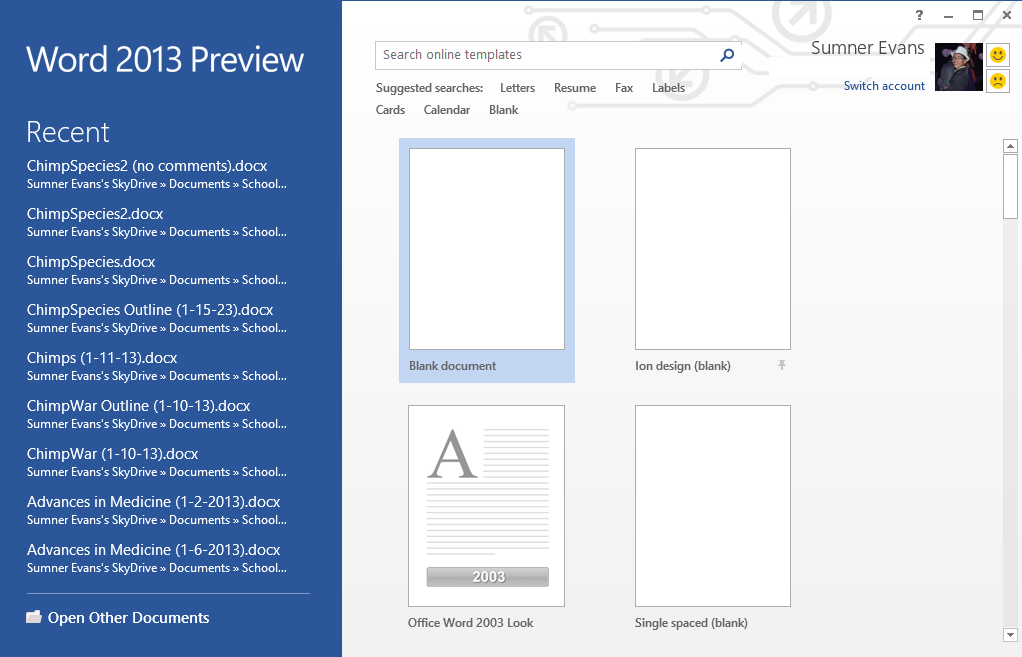
When you open Word, you immediately see your files. The first thing that I noticed about Office 2013 is that it puts your files first. On run, Word, PowerPoint, Publisher, and Access all open to a page with recent files, and a view of all the templates that you can use to create a new document/file. (See picture)
SkyDrive Integration
One feature that is really cool is SkyDrive integration. Basically, Microsoft has hard-coded SkyDrive into Office 2013.This is great because you don’t actually have to have the file on your local device/computer. (I use the SkyDrive desktop app and so all of my files sync anyway but if I had, for example, a Surface tablet I wouldn’t have to have all of my files stored on it.)
For those of you who are wondering “What in the world is SkyDrive?” it is basically Microsoft’s version of Dropbox. You can store your files on your personal SkyDrive. You get 7GB to start and can buy more space if you want. If you buy Office 365 you get 20GB more space (for a total of 27GB).
Smooth Cursor
One of the coolest aesthetic improvements to Office is the smooth cursor. Rather than moving instantly to a new position as you type, the new cursor glides along the page as you enter text. You may think that it shouldn’t matter that much but when you see it you get addicted to it immediately. I love it! It looks great in Excel as well. You can actually see the selection of a cell move!
The Ribbon
Love it or hate it, you have to have it and you may as well learn how to use it because pretty soon everything will be using it. (File Explorer has already made the transition.) Personally, it is a nice interface. It is clean and shows you only the stuff that you need. It’s also easy to find the feature that you want because they are categorized in the little tabs.
If you got a computer within the past few months, you probably have a computer with Windows 8. If you got one at Christmas, it is almost sure to be one with Win8 (unless the people who gave you the computer intentionally put Win7 on it). Random comment alert, I think that a lot of people who got a new computer for Christmas (especially the less young) were a little disappointed with the loss of their start button. Just a though. Anyway, about survival. Here are a few things that will help you get started with Windows 8.
Ever wonder why the search charm shortcut key is Win + Q? I think I know why Microsoft chose this as the shortcut key. Then I looked at the actual letter “Q.” Notice how it kinda looks like a magnifying glass The circle part is the lens, and the little tail is the handle. I know, it’s a long shot but it sorta makes since…